
Booking links for your website
A booking button on your website is a link to your OutwardOps booking page: all your trips, one booking flow, or a single trip. The page runs on a subdomain of your own website, such as book.yourcompany.com, and works on a phone. Old FareHarbor links forward to it. A framed widget you can embed inside another page is coming.
How do I add a Book button to my website?
Make any button or link on your site point at one of three addresses. Replace the company and trip names with yours:
| What the guest sees | Link |
|---|---|
| All your bookable trips | https://book.yourcompany.com/b/yourcompany |
| Only the trips in one booking flow | https://book.yourcompany.com/b/yourcompany?flow=salmon |
| One trip, ready to pick a date | https://book.yourcompany.com/b/yourcompany/half-day-salmon |
<a href="https://book.yourcompany.com/b/yourcompany/half-day-salmon">Book now</a>Flows are set up under Settings, Booking flows; see custom fields and booking flows. Trips marked private or staff-only never appear.
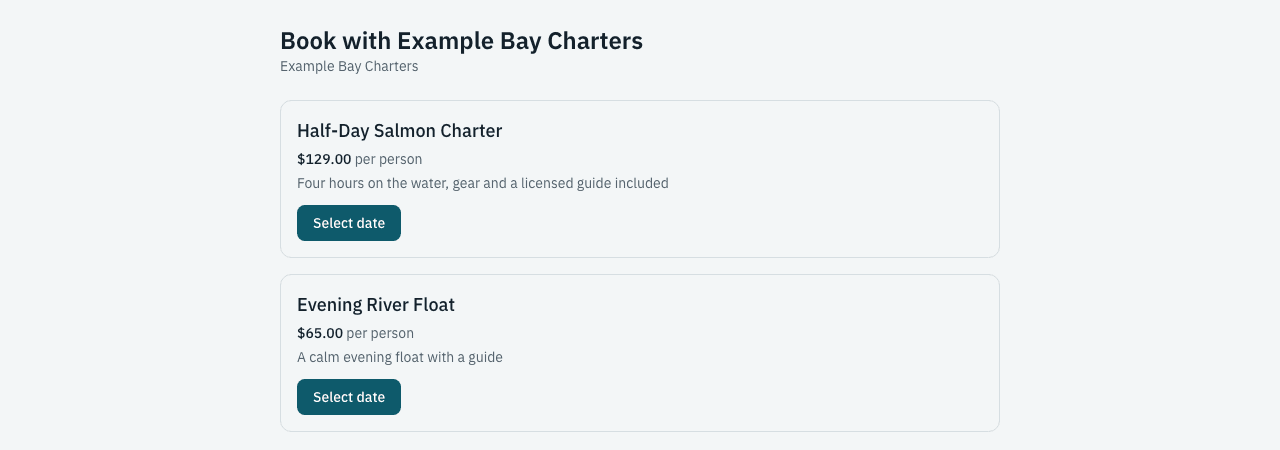
What does the guest do on the booking page?
The page is built for phones first. The guest picks a date and time, enters guests by customer type, answers any questions you set, and pays by card. They get a confirmation email and a link to view the booking. No guest account is needed. Fees, tax and tips show as separate lines before they pay, as described on online booking and checkout.
Can the booking page use a subdomain of my website?
Yes. Each company gets a booking page on a subdomain of your own website, such as book.yourcompany.com, and the page, the confirmation links and the trip pages all use it. OutwardOps sets up the hosting side with you; you add one record at your domain provider.
Can I tell which website or campaign a booking came from?
Yes. When a guest arrives with UTM tags (source, medium, campaign, term, content) or a click id from Google, Facebook, Microsoft or TikTok, OutwardOps saves them with the order. The Campaigns preset under Reports shows bookings by those sources.
Will my old FareHarbor links still work?
Yes, once your booking address points to OutwardOps. Old link shapes such as /embeds/book/yourcompany/ and the calendar embed forward the guest to your company page, the matching booking flow, or the matching trip. A trip link needs the trip's FareHarbor item id, which the FareHarbor import carries over; otherwise the guest lands on your company page. The forward happens in the browser, not as a permanent redirect.
Can I embed the booking page inside my own page?
Not yet. Booking pages open as their own page and cannot be shown inside a frame on another site. An embeddable booking widget and calendar are planned for a later release. Until then, use a button that links to the page, or a pay link for one-off charges.
Ask about booking buttons and embeds in a demo
Frequently asked questions
Do guests leave my website to book?
Yes. A booking button opens your OutwardOps booking page, which runs on a subdomain of your own website. An embeddable widget that stays inside your page is coming.
Can I link to just one trip?
Yes. Link to the trip's page on your booking address, or create a booking flow with the trips you want and link to it.
Do I need a developer?
No. A Book button is a normal link. Your web person pastes the address into the button.
Does it work on a phone?
Yes. The booking page is built mobile first.